StudentSquare
ParentSquareEducation
3.3286.00 Reviews
- Version
- 2.116.0
- Installs
- 100.00K
- Age Rating
- Everyone
Screenshots
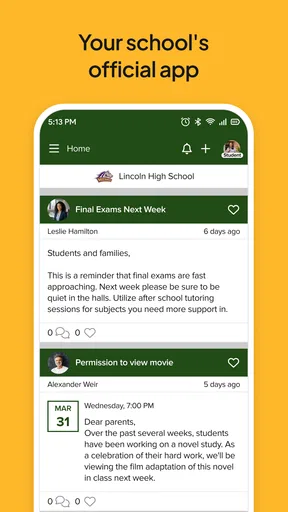
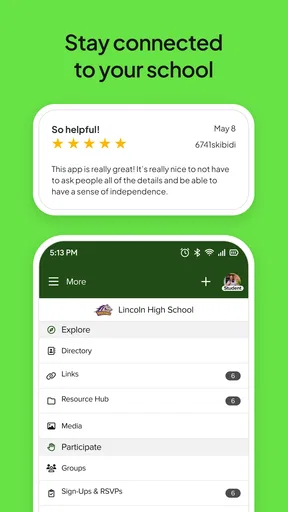
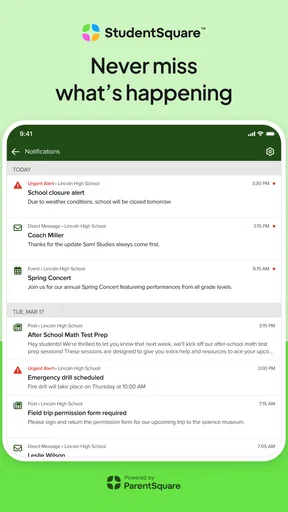
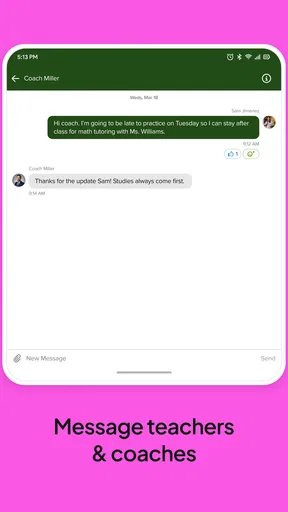
Our Review of StudentSquare
 Analysis by Appyee
School communication is one of those areas where convenience matters, but trust matters just as much. Messages about attendance, schedules, activities, or classroom news can affect a student’s day, so I approached StudentSquare less like a casual social app and more like a private school communication tool that needs clear boundaries. Developed by ParentSquare, it is a free education app with an Everyone age rating, and its purpose is to connect students with school-related communication in one place.
My overall impression is cautious but positive. The app can be useful when a school has adopted it as part of its communication routine, especially for students who want a direct way to keep up with school notices. At the same time, its value depends heavily on how consistently the school uses it and how clearly accounts are managed. This is not an app I would install simply because it looks useful; it makes sense when there is a real school connection behind it.
How StudentSquare earns trust in a school setting
The first thing I noticed about the product’s identity is that it is deliberately narrower than a general messaging platform. The store summary presents StudentSquare as a private communication platform for schools, which sets an important expectation: this is intended for an organized school community, not for open-ended public conversation. That focus is a strength because students are less likely to confuse it with a broad social network or a general-purpose chat service.
That private-school context also changes how I judge the app. With a typical messaging app, I mainly ask whether conversations are fast and easy to manage. Here, I also ask whether the app helps me understand who is communicating, why a message matters, and whether I have control over my own participation. A school message often carries more weight than an ordinary notification, so a clean account relationship is more important than flashy design.
The developer is ParentSquare, and the app has been available since October 24, 2018. Its current version is 2.116.0, while devices running Android 7.0 or later can use it. Those details make the app accessible to many older Android phones, which is useful in families where replacing a device is not a priority. The practical trade-off is that older hardware may not offer the same smoothness as a newer phone, particularly when several school communications arrive close together.
StudentSquare has passed the threshold of over one hundred thousand installs and holds an average rating of 3.3 from around eight hundred ratings. I would not treat that rating as a final verdict, because school communication apps are often judged through account setup, district configuration, and notification habits as much as through the software itself. Still, it is a useful reminder to approach the experience realistically rather than expecting every school to configure it in exactly the same way.
What the private model means in everyday use
For a student, the main benefit is concentration. Instead of searching through unrelated group chats, personal email, or paper notices, school-related communication has a dedicated home. That can reduce the chance of missing a message simply because it was mixed with ordinary conversations. I especially see value for students who move between classes, activities, or campuses and need one recognizable place to check what the school has sent.
A realistic example would be a student arriving home after a busy afternoon. Rather than asking several classmates whether a school notice was sent, the student can check StudentSquare and review the communication associated with the school account. The important advantage is not that the app replaces every other channel; it is that it gives the student a consistent place to look first.
That consistency only works if the account is connected to the correct school relationship. I would take a few minutes during setup to confirm that the displayed school context and account details make sense before relying on the app. If a parent, student, or school administrator is helping with setup, agreeing in advance who will monitor messages can prevent duplicated effort and confusion over whether something has already been seen.
Controls and account habits worth checking
The most useful trust habit with any school app is to separate what the app can do from what the user expects it to do. StudentSquare is designed for school communication, but that does not automatically make it a complete academic dashboard, a replacement for every school system, or a private diary. I would use it as a communication channel first and avoid assuming that every assignment, emergency update, or administrative detail must appear there unless the school has clearly made that part of its process.
Before depending on notifications, I would check the phone’s notification settings and the app’s available communication controls. A silent notification can be missed, while an overly active setup can become background noise. My preferred approach is to allow important school communication to appear clearly, then review the settings if the volume becomes distracting. The goal is not to mute everything; it is to make the app noticeable without allowing it to dominate the phone.
Account control is equally important when a student changes schools, shares a device, or stops using the service. I would review the signed-in account before handing the phone to someone else and remove access through the device’s normal account-management tools when the school relationship ends. That is a simple step, but it matters more here than with a casual app because school communication can contain personal context even when the app itself is not being used for private conversation.
My strongest practical advice is to treat the account connection as the foundation of the experience. If the wrong account is selected, notifications may be confusing, and the user may blame the app for a problem that actually began during setup. A quick account check is more valuable than spending time customizing the interface.
Handling sensitive moments without overtrusting the app
School communication can involve sensitive situations: a change to a student’s day, a message intended for a particular group, or information that should not be forwarded casually. I would read the audience and context before sharing anything. A message that is appropriate inside the school community may not be appropriate to copy into a public group or post on social media.
This is also where the word “private” needs a careful reading. In the app’s stated role, private means school-focused communication rather than an open public feed. It should not be interpreted as permission to share confidential details freely or as a guarantee that every message is suitable for every recipient. I would still use ordinary digital caution: protect the phone, avoid sharing login details, and check recipients before responding.
Students and families should also decide which channel is appropriate for urgent matters. I would not assume that a school communication app is the fastest route for an emergency unless the school explicitly says so. For immediate safety concerns, the school’s established emergency procedure should take priority. StudentSquare is more naturally suited to organized school communication than to replacing emergency services or a direct call to the relevant office.
Another sensitive moment occurs when a student receives a message that seems unclear or contradictory. My approach would be to verify it through the school’s normal contact method rather than forwarding it widely. This is a small but important distinction: the app can help deliver information, but the user still needs judgment when a message affects attendance, travel, deadlines, or personal arrangements.
Where it fits beside familiar alternatives
The usual alternatives are school email, paper notices, a school website, general messaging groups, or a learning-management system. StudentSquare sits between these options. Compared with paper, it is easier to revisit and less likely to disappear in a backpack. Compared with a general group chat, it has a clearer school purpose and less social clutter. Compared with email, it can feel more focused for users who do not regularly monitor an inbox.
However, email may still be better for keeping a long written record, searching across years of correspondence, or communicating with an individual outside the app’s school workflow. A learning-management system may be the stronger choice for assignments, grades, submissions, and structured coursework if the school uses one. A website can remain the best place for public information that does not require a personal account.
This means StudentSquare is not automatically the best single destination for everything related to school. I see it as the most useful option when the school has made it a dependable communication layer and students need a focused place to check updates. If the school sends messages through several unrelated systems, the app may add another inbox rather than simplify life.
General messaging groups can sometimes feel faster because classmates already use them, but they also create problems: rumors, missing context, repeated questions, and unclear authority. StudentSquare’s school-centered purpose is preferable when the goal is to identify official communication. The trade-off is that it may feel less flexible than an informal group, which is exactly why it is better suited to official notices than casual student conversation.
Three workflows that make the app more useful
First, I would create a short daily checking routine instead of reacting to every alert. A student could review StudentSquare after school, then check again before leaving home in the morning. This avoids the two extremes of ignoring notifications and constantly interrupting homework to inspect every message. The routine also makes it easier to notice whether the school is using the app consistently.
Second, I would use the app as the starting point for verification, not as the only memory system. If a message affects a later event, I would note the relevant detail in a calendar or task list after reading it. This is especially helpful when school communication is mixed with personal commitments. The app delivers the message; a separate reminder system helps turn that message into an action.
Third, I would establish a family rule for ownership. If both a student and a parent have access to school communication, decide who is responsible for checking routine notices and who handles follow-up. This prevents a common failure: everyone assumes someone else saw the message. The rule can be as simple as the student handling ordinary updates while a parent reviews matters that require a family decision.
A fourth useful habit is to pause before replying. School messages can be read quickly and answered emotionally, especially when a student feels misunderstood. I would reread the message, check who will receive the response, and use a more direct school contact route when the issue is sensitive. This is not a limitation of one particular button; it is a sensible way to use a communication tool connected to real school relationships.
Who should use it, and who should look elsewhere
I would recommend StudentSquare to students whose schools actively use it and to families who want a dedicated school communication channel rather than another informal group chat. It is also a reasonable fit for households that need a straightforward way to keep school notices separate from personal messages. The free price removes a financial barrier, which is important for a school-facing tool intended for broad access.
I would be more hesitant to recommend it to someone whose school barely uses the platform. An app cannot create useful communication on its own; if official updates arrive elsewhere, installing it may simply create uncertainty about which channel matters. I would also suggest looking at the school’s learning-management system instead when the main need is coursework, grades, or assignment tracking rather than communication.
Students who strongly prefer email archives may find email easier to search and organize. Families managing several schools may also prefer a broader system if it genuinely brings all institutions into one view. StudentSquare’s focused identity is an advantage for a single school relationship, but it may feel limited when a household wants one universal education dashboard.
My cautious verdict after weighing trust and control
StudentSquare is a sensible education app when its role is understood clearly: a school-centered communication space, not a universal replacement for email, coursework tools, emergency procedures, or family organization. I like the focused purpose and the possibility of reducing clutter, but I would only rely on it after confirming the correct account, checking notification behavior, and learning how the school expects students and families to use it.
The app is free, rated for Everyone, and compatible with Android 7.0 and later, so access should be practical for many users. Its 3.3 average shows that the experience is not universally smooth, and I think that is fair context for a tool whose usefulness depends partly on local school habits. The best results will come from treating it as one carefully managed communication channel rather than assuming it contains every important school detail.
My recommendation is therefore measured: install it when your school has made StudentSquare part of its communication routine, keep your account and phone controls tidy, and use good judgment with sensitive messages. If your school’s communication is already clear through email or a learning platform, another app may not improve anything. But when official school updates are meant to arrive here, it can provide a focused and practical place to stay informed.
Verdict
Strengths of StudentSquare
- Keeps school announcements, events, and updates in one convenient place.
- Supports direct communication between families and school staff.
- Push notifications help users avoid missing important school information.
- Useful for checking messages and updates while away from the school website.
- Available on mobile devices for quick access wherever parents are.
Limitations of StudentSquare
- Requires participation from the school before all features become useful.
- Notification volume can become overwhelming during busy school periods.
- Some information may be difficult to find in a crowded activity feed.
- Account or login issues can temporarily block access to school updates.
- The app’s usefulness depends on how consistently staff post new content.
Other Releases by ParentSquare
View All
ParentSquare
Education4.3
Similar Picks in This Category
View All
Duolingo: Language Lessons
Duolingo4.7

Google Classroom
Google LLC2.8

Unacademy: Learn & Crack Exams
Unacademy3.2

Bible App for Kids
Life.Church4.4

Cake - Learn English & Korean
Cake Corp.4.7

Brainly: AI Homework Helper
Brainly4.5
Frequently Asked Questions
What is StudentSquare, and who is it designed for?
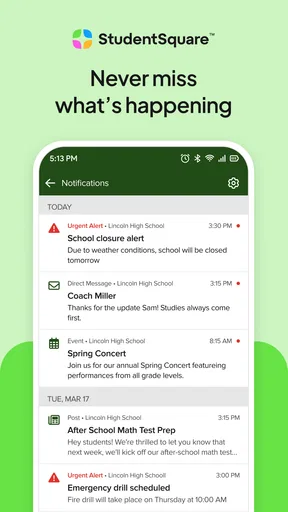
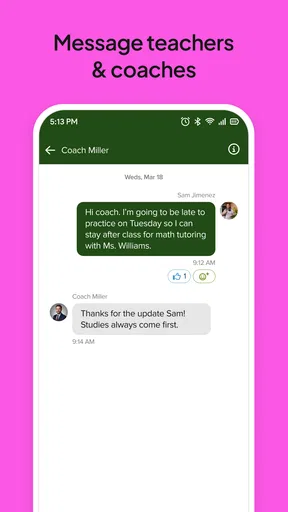
StudentSquare is a school communication app that helps students and families stay connected with teachers, schools, and districts. Depending on how the school has configured the service, users may receive announcements, messages, calendar updates, reminders, forms, and other important information. Access is generally provided through a participating school or district, so downloading the app alone may not be enough to use all of its features.
How do I log in to StudentSquare?
To use StudentSquare, you typically need an account connected to your school or district. Registration or sign-in may be completed with an email address, phone number, invitation link, or login details supplied by the school. If your child or student does not appear in the account, or you cannot access the app, the school office or district administrator will usually need to update your contact information or permissions.
What features are available in the StudentSquare app?
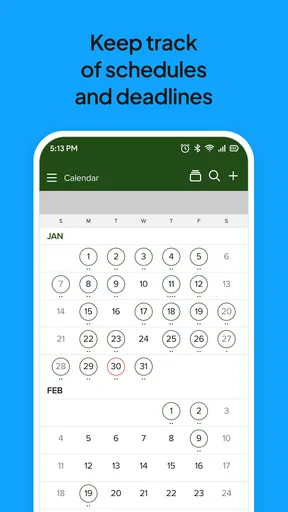
StudentSquare can provide a central place for school-related communication, including direct messages, school announcements, event reminders, calendars, attendance or activity notifications, forms, and sometimes translated messages. The exact tools can vary considerably between schools because administrators control which features are enabled. It is therefore best to treat the app as a communication hub rather than assuming every school offers the same options.
Does StudentSquare support multiple languages and notifications?
StudentSquare may offer language preferences and message translation options, which can make school communication more accessible for multilingual households. Users can also receive push notifications for new messages, announcements, or reminders. However, translation quality and available languages may differ by message and account settings. After installation, review the notification and language preferences carefully so important school updates are not missed.
Is StudentSquare free, and is it safe to use?
StudentSquare is generally available to families and students without a separate subscription fee, although access depends on participation by the relevant school or district. Because the app handles school communications and personal account information, users should download it from an official app store, use a strong password, and keep the app updated. Privacy and data practices should also be reviewed in the school’s policies and the app’s privacy documentation.
